

Salesforce is a critical component of most sales teams. It can also become one of their biggest headaches.
Sales teams battle the Salesforce platform’s inflexibility, high per-seat costs, notoriously poor mobile app, and a necessary reliance on developers to create an environment that actually adapts to their company’s system.
With Glide, you can create flexible, mobile-adaptive interfaces for that Salesforce data that can be perfectly tailored to your unique needs. Sales teams get lightweight, mobile, adaptive tools that are better suited to their actual day-to-day work, backed up by the power of a centralized Salesforce database.
You can build apps for lead tracking, sales pipeline management, customer onboarding and handoffs, and even quote and sales proposal creation, all without needing a team of developers or the budget to hire them. The integration does the work, and you can create exactly the interface you need for any Salesforce process.
Here’s how you can make your Salesforce data work better for your sales team with Glide
Why connect Salesforce to a custom Glide app?
Glide’s no-code platform allows you to build apps without any coding or engineers, and seamlessly integrate them with your Salesforce data. It has a drag-and-drop interface that is easy to learn, allowing for quick and easy setup of new tools or modification of existing ones.
Glide apps are also mobile-optimized by default and work well on any device, whether a smartphone, tablet, or computer. They can be integrated with other tools to collect all the relevant data in one place. If you're interested in using AI for sales, your Glide apps can use automation tools and artificial intelligence to streamline even more of your sales processes.
type: embedded-entry-inline id: 3mHQkjln6Z4K9kiztTzC2Y
Salesforce is often described as a platform that's “built for managers, not for salespeople.” While it gives a detailed top-level view of your operations, it’s not ideal for fast-moving sales teams that need tools that won’t slow them down. Pairing the two tools gives you the best of both worlds. Salesforce provides a robust data engine and a single source of record, while Glide offers a nimble, user-friendly front-end for interacting with that data.
You can create tools that are fully customized to the needs of your sales team, helping them become more efficient, better informed, and more focused on closing deals.
Challenges with Salesforce that custom no-code can help overcome
Businesses rely on Salesforce as a CRM, but most also encounter consistent limitations with the platform.
“We had this big idea to get our reps using the Salesforce mobile app. Spent time setting it up, added fields, trained the team. But honestly? They hated it. Too many steps, too much loading, especially mid-route with low signal.” - 2025 Salesforce Review
Challenges can include:
Challenging implementation: Salesforce is incredibly customizable. However, actually implementing those customizations is very challenging, requiring time, dedicated attention, and experienced Salesforce developers and admins on staff. Adjusting the platform to your needs is complex and requires technical expertise or custom code. It’s challenging enough that many businesses don’t execute their implementation well, leaving sales teams stuck with a platform that doesn’t fit their needs well.
Cost and access limitations: Salesforce licenses are costly, starting around $25 and climbing to $500 for top-tier plans. For a growing team, those fees add up quickly. Companies often restrict access to avoid extra fees, which makes it hard to get CRM data to everyone who needs it. Team members are forced to wait on coworkers to pull data for them, and key information ends up bottlenecked in the hands of a few users.
Data silos and mismatched sources: Limited access to Salesforce creates data silos. Vital customer or operational data might live in Salesforce, yet it’s invisible to other departments that could benefit from it. Teams may revert to using spreadsheets or other shadow systems, resulting in even more fragmented information.
Mobile usability: The Salesforce mobile app is notoriously difficult to use. Reviews cite its complex interface that requires training to learn. To configure the app in a useful way requires time and technical effort. The app also has consistent performance issues such as lagging, glitching, and even crashing, especially when network strength is poor or the app has extensive custom features. When employees find a system cumbersome or inaccessible, adoption plummets. One review noted, “The mobile app is terrible, hard to navigate, and incredibly sluggish - to the point where I stopped trying to use it.”
Benefits of integrating Salesforce with Glide
Creating custom Glide apps to integrate with your Salesforce data can yield significant benefits for sales, marketing, and operations teams:
Streamline workflows and save time
Teams can eliminate a lot of busy work by using Glide as a front-end for Salesforce data. Instead of digging through Salesforce reports or updating records one by one in the CRM, users get a simplified interface tailored to their task. A Glide CRM app can enable employees to easily search for customer information and view multi-system data, saving countless hours of copying and pasting between Salesforce, spreadsheets, and other tools. Faster access and easier data entry mean reps and ops folks can focus on selling and serving customers, not wrestling with software.
Improve mobile access and UX experience
Salesforce’s mobile app and interface can be clunky for certain use cases, whereas Glide apps are mobile-responsive and user-friendly by default. Your interface can be streamlined for ease of use, presenting only the necessary fields and buttons for a given role. A Glide app for field technicians or sales reps might only show today’s appointments and a checklist to complete, making it significantly more user-friendly than navigating Salesforce on a phone. By having Salesforce in the back-end and Glide as the front-end, companies provide a clean user experience without losing the robustness of Salesforce behind the scenes. This improved UX often translates to higher data quality as well. If it’s easy to log activities or update status, users are more likely to do it promptly.
Reduce costs
Using Glide apps strategically can reduce the need for expensive Salesforce licenses. You might have many team members or external partners who only need occasional access to view or input data. Instead of each needing a Salesforce seat, you can have a few integration users or API access and expose the data through a Glide app for those users. One business, Catapult Sports, saved over $10,000 in Salesforce licensing costs by deploying a Glide-based solution for over 100 users who just needed to retrieve data occasionally.
Gain customization and agility
Glide is a no-code platform that enables your teams to create customized apps quickly, without needing to code or hire outside development assistance. This means your software will be tailored to your sales processes, instead of having to force your process to fit the software. If Salesforce’s standard objects or interface don’t exactly match a workflow (for example, tracking a very specific metric or a custom approval process), you can build a Glide app that does. And if the process changes next week, you can easily update the app yourself.
Unify data views
Sales operations typically involve data from not only Salesforce but also from other systems, such as ERP, support, or marketing platforms. Glide apps can centralize data from multiple sources for your team. You can pull in Salesforce data alongside data from, for example, a spreadsheet export of your ERP, NetSuite order info, and Zendesk ticket statuses. This gives a more holistic view of a customer or deal. In Salesforce alone, you might need costly integrations or a developer to surface external data, whereas Glide can unify it relatively easily. When teams have all relevant info in one place, they can respond to customers or make decisions much more quickly.
Empower frontline teams
A less tangible but important benefit is the empowerment that comes from giving non-technical teams the tools to optimize their own workflows. Rather than submitting a request to IT for a Salesforce page layout change or a new field, a sales ops analyst could build a small app in Glide that makes their process easier. This sense of ownership can boost innovation and morale, helping your team solve their own problems, big and small.
How real-life businesses use Salesforce and Glide together
Many organizations are pairing Salesforce with Glide’s no-code app builder to extend their CRM capabilities in innovative ways. By integrating Salesforce data into custom Glide apps, companies can tailor workflows, empower more team members with real-time information, and streamline processes without relying on engineers.
Catapult Sports - Giving teams access to customer data without spending a fortune on Salesforce licenses
type: embedded-entry-inline id: 6wYPTj34QHpJqsQ5MgI3hD
Catapult Sports built a Glide-based CRM app that unified data from Salesforce, NetSuite, and Zendesk. This app provided their team with a single source of truth for customer and order information, eliminating the tedious work of cross-checking multiple systems. Over 100 employees who only needed occasional data lookup could use the Glide app instead of full Salesforce accounts. Catapult reports they saved over $10,000 a year just in Salesforce licenses.
The app also improved efficiency across the team. Instead of juggling Salesforce reports, NetSuite exports, and Zendesk tickets, employees now use the Glide app to instantly search for anything, from orders to support escalations, in one place. Being able to use conditional logic on the data within Glide also significantly improved the turnaround time for answering questions about customers. This broader access to information led to faster response times and higher productivity.
yetipay - Giving sales agents better mobile access to customer data in the field
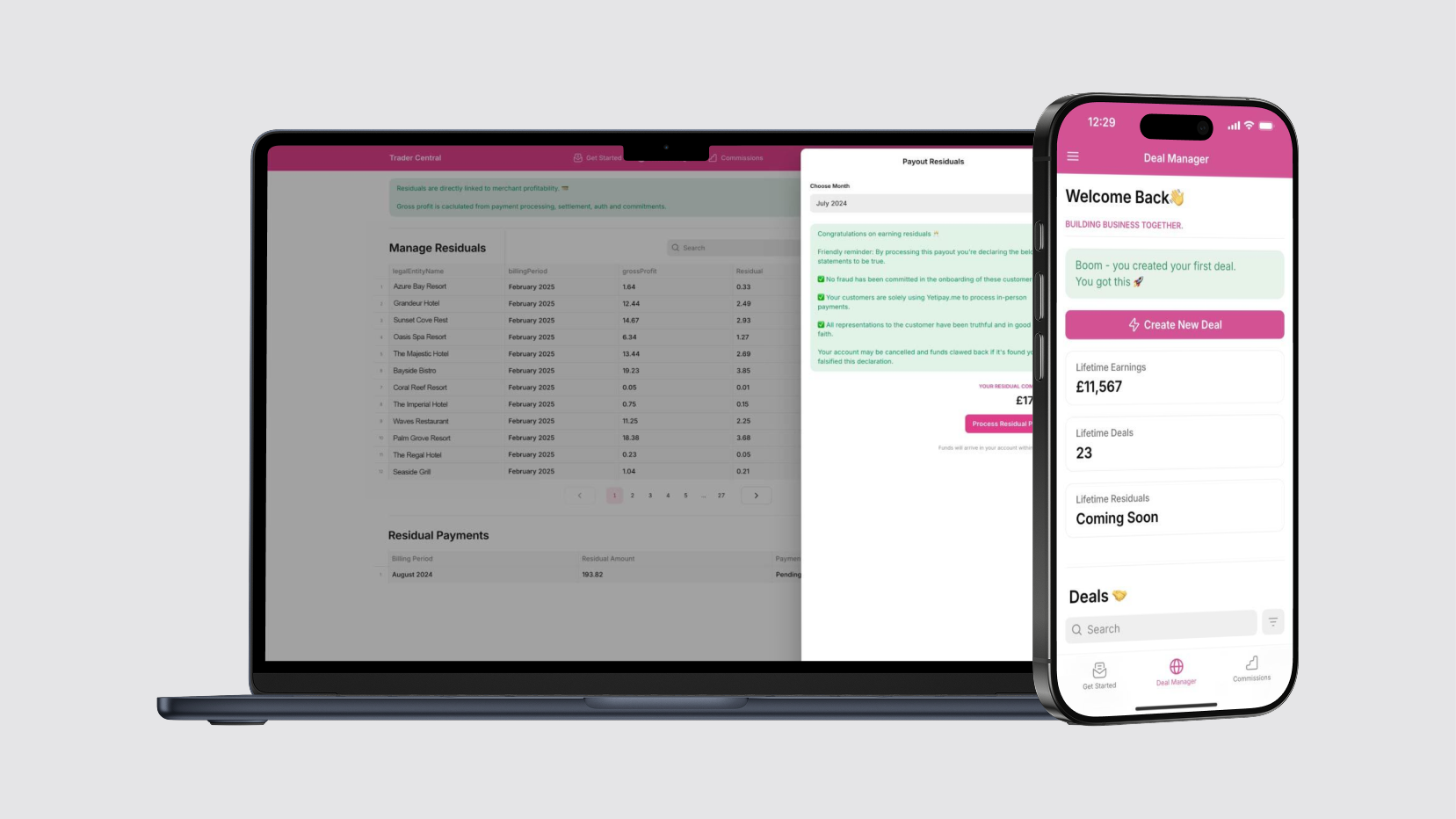
British payments company yetipay equipped its field sales agents with Glide apps to manage leads, quotes, and contracts while on location. With them, reps can price deals, generate contracts on the spot, and instantly show customers their potential savings, all through a mobile app.
Essentially, Glide transformed yetipay’s patched-together system into a streamlined mobile CRM that any representative could carry in their pocket. This contributed to a 750% revenue growth in one year for yetipay’s business. By equipping reps with better information and tools, yetipay scaled its annual revenue from around £400,000 to £3.5 million in just a single year.
“We would not have been able to grow the way we did without the tool, fundamentally,” said founder Oliver Pugh.
BW Workplace Experts - Removing data silos in order to make better data-driven decisions

BW: Workplace Experts, one of the UK’s leading construction fit-out firms, runs a 9-figure business on a suite of Glide apps integrated with their enterprise systems. Facing complex projects and mountains of data, BW’s tech team found that traditional spreadsheets and even some Salesforce processes weren’t keeping up. Data was siloed. The team was filling in gaps between Salesforce and Procore data using spreadsheets, which was error-prone and diverted employees from their core job of delivering projects.
To address this, BW partnered with a Glide Expert agency to rapidly develop custom apps that integrate these systems. The flagship solution was a Cost Value Reconciliation (CVR) app that consolidates all the financial data from dozens of ongoing construction projects. In just one week, the team had developed a proof-of-concept Glide app that pulled data from Salesforce, Procore, and Excel, and fed it into a central dashboard for management. By removing the data silos between departments, BW ensured that everyone, from site managers to the finance director, is now working with the right information at the right time, rather than having to juggle multiple systems.
Type.ai - Using AI agents to analyze Salesforce customer data
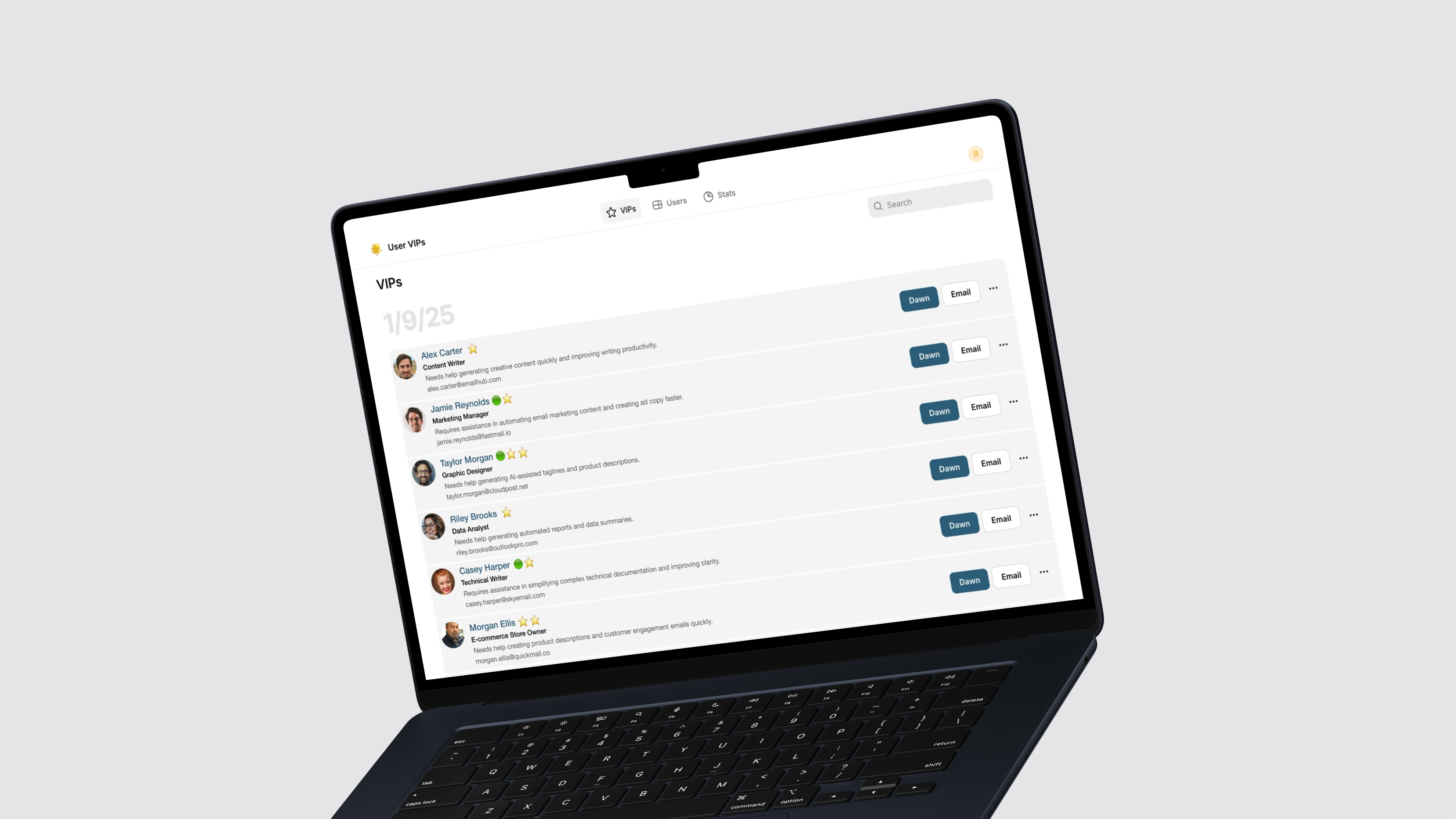
Type.ai, a Y Combinator-backed startup, needed a smarter way to sift through thousands of new user signups and identify the most promising leads to nurture. Their CEO, Stew Fortier, knew an AI agent could help with this process, but it was too difficult to integrate it with the third-party tools, such as Salesforce and Hubspot, that he needed to extract data from. Building a custom AI lead-scoring agent on Glide solved this problem. It became a virtual Salesforce analyst that evaluates each new signup and flags high-value customers for outreach.
The AI agent parses through every new Salesforce lead’s data, from profile information to product usage patterns, and uses OpenAI-powered logic to determine if they appear to be a VIP. It then automatically generates a tailored introductory email and sends it to those users to schedule a call with the CEO. With the agent, he was able to send 10x more customized onboarding emails and improve conversion rates by a double-digit percentage. The Glide AI agent acts like an autonomous sales assistant living on top of Type.ai’s customer data and saving hours of time every week for the time-strapped startup.
Mintleads - Sharing lead information securely with clients
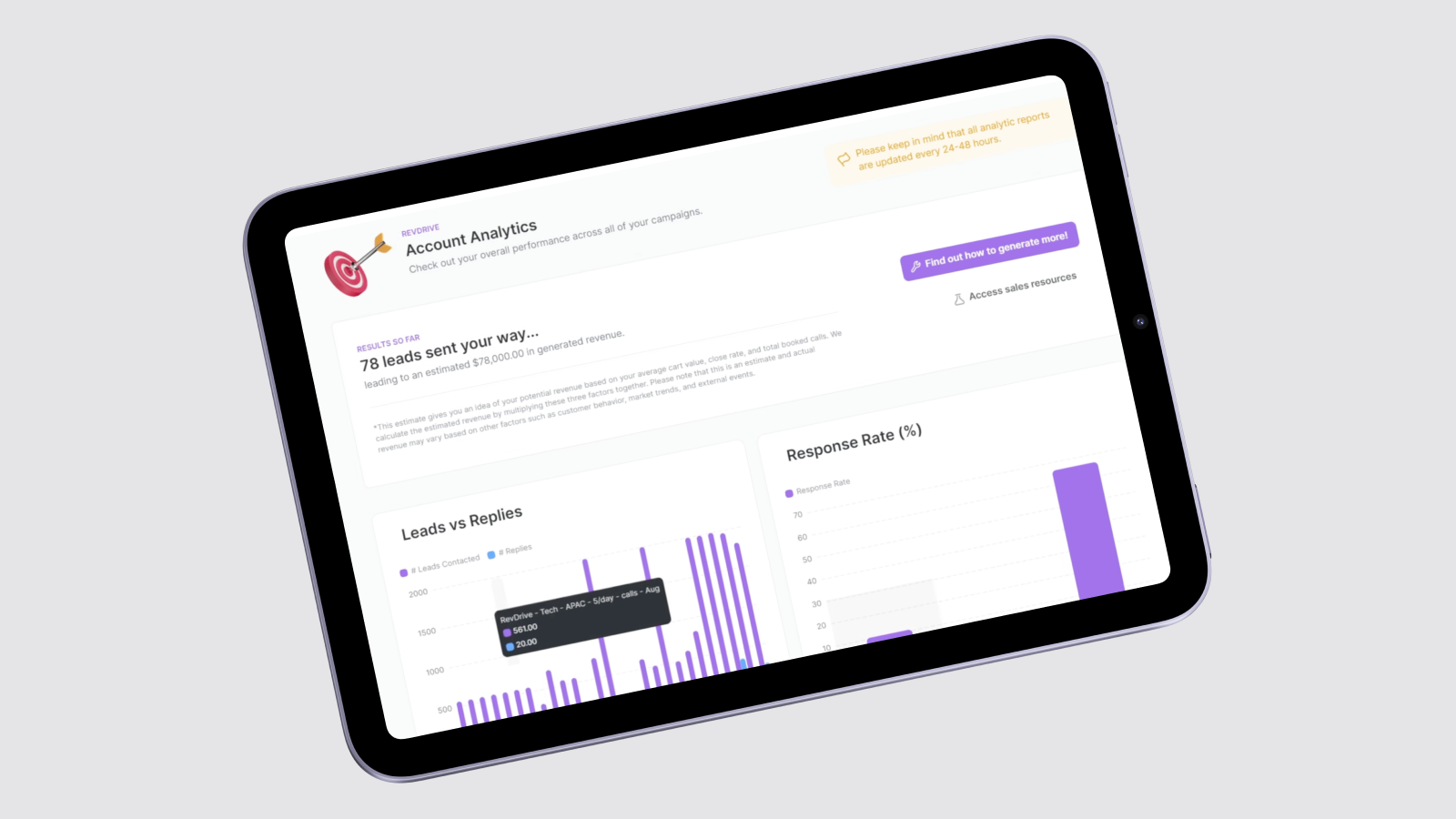
MintLeads, a fast-growing B2B lead generation agency, used Glide to bridge the gap between their internal CRM systems and the clients they serve. As an agency, MintLeads generates sales leads for dozens of customers, and keeping those clients updated on campaign progress was a challenge.
To solve this, MintLeads built a secure client portal app on Glide, where each client can log in and view their lead pipeline in real-time. Through this portal, a marketing client can view the number of prospects reached, conversion rates, meeting bookings, and other performance metrics for their campaign, all pulled live from MintLeads’ internal CRM. This transparency “saved us a ton of time by reducing the number of times our clients had to ask our team, ‘Hey, what’s going on?’” says Jack Foley, Director at MintLeads.
The Glide app helped to build trust with clients and essentially allowed MintLeads to productize its CRM data into a client-facing service. Instead of sending weekly reports, MintLeads differentiated itself by giving clients a 24/7 window into the work being done on their behalf. The Glide app handles authentication, ensuring that each client only sees their own data, while sharing information securely and privately. And because Glide can integrate via API, the portal pulls data directly from MintLeads’ CRM and even writes back updates when needed, keeping both the agency and the client on the same page.
Key use cases in sales for Glide and Salesforce
Glide and Salesforce together can support a variety of sales workflows. Here are some of the most common and impactful use cases:
Mobile lead tracking
For sales development or marketing teams, a Glide app can serve as a lightweight lead tracking system on top of Salesforce. New leads captured via web forms or events in Salesforce can be displayed in a Glide app for quick follow-up by reps. Leads gathered in the field can be entered through a Glide mobile app and then pushed into Salesforce as new Lead records. This approach keeps all prospects in the official CRM while giving sales reps a user-friendly app for initial outreach. With Glide’s flexibility, you can design custom lead forms, scoring systems, or follow-up checklists.
Glide can also be used as a simple sales lead dashboard. Salesforce can be overwhelming for a quick view, so a Glide app could display all new leads or hot leads assigned to a user, pulled via the Salesforce integration. The rep can then tap a lead in the Glide app and view key information from Salesforce fields. If needed, they can update a status or add a note, which triggers a corresponding Salesforce update. This kind of mini-app makes it easier for sales teams to manage leads on their phones, tightening up response times. Effective lead tracking like this can help plug leaks in your funnel. By clearly surfacing leads and their statuses, you ensure timely follow-ups and handoffs, which leads to more conversions.
Sales pipeline management
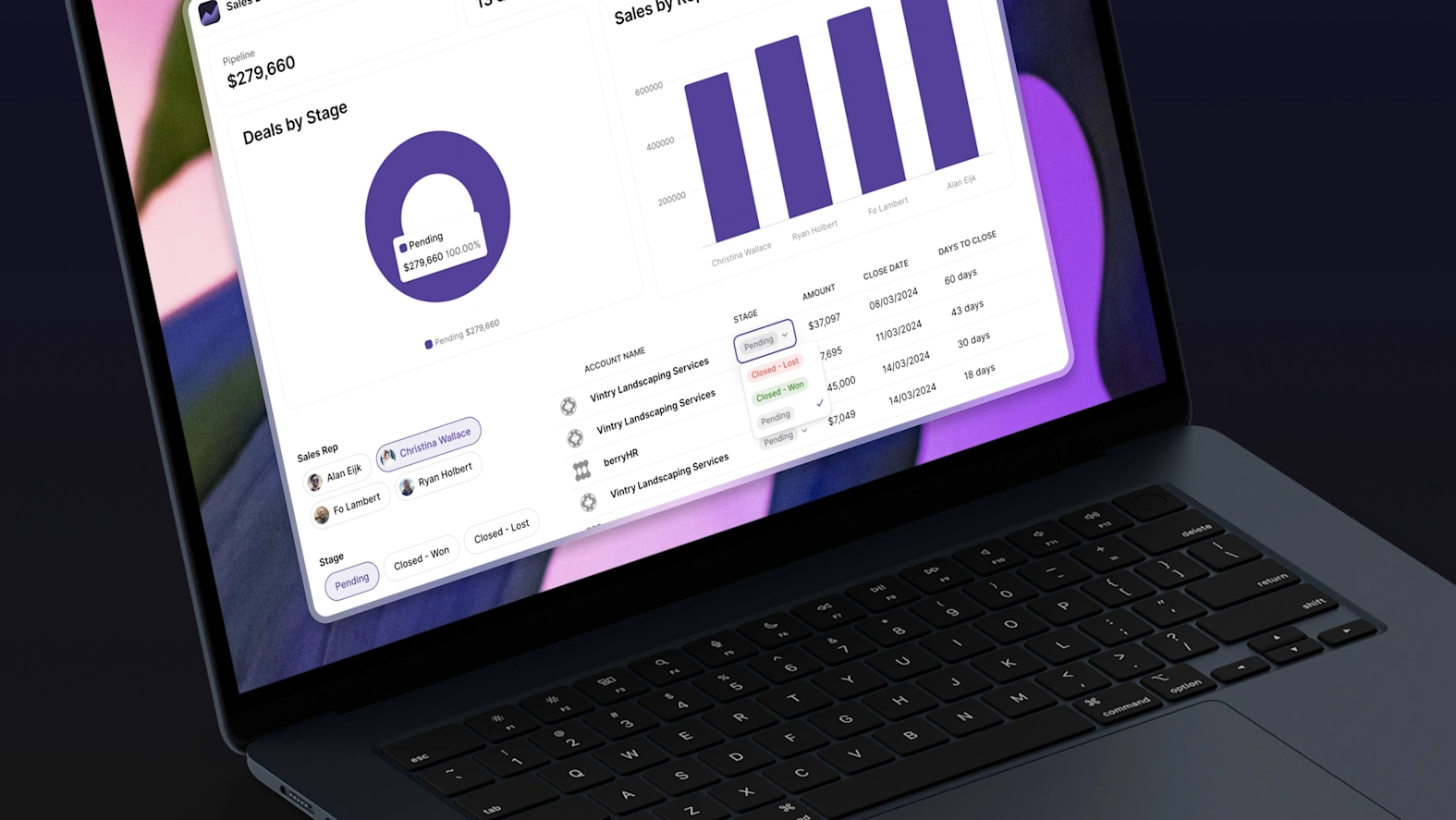
Pipeline reviews and deal updates often require you to log in to Salesforce and navigate through reports. With Glide, you can build a tailored pipeline management app for your team that doesn't require a Salesforce login. A sales manager’s Glide app can display all open opportunities by stage (e.g., in a Kanban or list view) by pulling data from Salesforce’s Opportunities object. From there, they can filter or sort deals and view details such as deal size, products, and next steps. This provides a clear, at-a-glance pipeline overview on any device.
Since data syncs back and forth, the app can also allow reps to update deal stages or add notes without needing to access Salesforce’s interface. Using Glide’s actions, a representative can move an opportunity to the next stage with one tap in the app, triggering a “Update Opportunity” Salesforce action in the background. This streamlined pipeline updating can encourage reps to keep CRM data current, as the process is faster and mobile-friendly.
Customer onboarding and handoffs
When a lead converts to a customer, there’s often an onboarding process involving multiple steps or departments. Glide can be used to build a customer onboarding app that interfaces with Salesforce accounts or cases. For example, when an Opportunity is marked “Closed Won” in Salesforce, you could have a workflow that creates a record in a Glide “Onboarding” table or simply have Glide query Salesforce for all new customers.
The onboarding team can then use the app to track tasks for the new account, such as contract countersignature, scheduling a welcome call, setting up products, and conducting training sessions. Signatures can be collected directly through the app, further streamlining the process. As tasks are completed in the Glide app, it updates the corresponding Salesforce record, ensuring accurate data.
Quote generation and sales proposals
Generating quotes quickly and accurately is another way a Glide app can complement Salesforce. While Salesforce has quoting tools, they can be complex or require additional licensing, such as Salesforce CPQ. With Glide, an operations team can create a quote generator app for reps to use in the field or during sales meetings. The app can push an Opportunity or Quote record back to Salesforce via the integration and then connect to a service like PDFMonkey or DocsAutomator to produce a PDF quote that can be emailed to the client or connect automatically to a customer-facing app.
How to connect your Salesforce database to your Glide app
Glide offers a large number of native integrations that make it easy to connect your custom apps to all the other tools your team uses at work. These integrations enhance the capabilities of your tools and extend their power. If a native integration doesn’t exist, you can use APIs to build custom integrations or enlist the help of third-party automation tools like Make and Zapier.
Here’s how to connect Salesforce to your Glide apps.
Using Glide’s native integration
Glide’s native Salesforce integration lets you connect leads, contacts, accounts, opportunities, and other CRM data directly from your Glide apps. You’ll need a Salesforce Developer account and a Glide account with an Enterprise plan to set this integration up.
This integration is easy to connect to in just a few clicks. In Glide, click Settings and navigate to the Integrations tab, where you will select Salesforce. Sign in to your Salesforce account and allow the necessary permissions. Now, you can begin adding buttons, components, and data from your Salesforce account to your app interface.
The Salesforce integration in Glide provides access to 140+ actions across 32 Salesforce objects, including:
Leads - Potential customers and prospects
Contacts - Individual people associated with accounts
Accounts - Organizations and companies
Opportunities - Sales deals and revenue opportunities
Cases - Customer support requests and issues
Campaigns - Marketing campaigns and initiatives
Tasks - Activities and to-do items
Events - Calendar events and meetings
Products - Products and services you sell
Orders - Customer orders and purchases
And many others
For most objects, Glide supports standard actions:
Create - Add a new record
Delete - Remove a record
Find by ID - Retrieve a specific record
List - Get multiple records
Update - Modify an existing record
If you need more complex deep integrations, you can use the Call Salesforce API to customize your Salesforce connection.
Using Make or Zapier
If you want a very simple automated connection to Salesforce, you also have the option of using third-party automation tools. Some businesses may opt for direct integration over third-party automation tools since a native Glide integration is more secure and requires less vetting. If you want a thorough walkthrough, LowCode Agency has written a detailed guide to connecting to your Salesforce database to Glide.
Zapier: Glide’s Zapier integration allows you to connect Salesforce and Glide with automated triggers and actions. For instance, “When a new record is created in Salesforce, add a row in Glide,” or vice versa. It’s ideal for straightforward workflows, such as form submissions, status updates, or nightly syncs.
Make (formerly Integromat): The Make integration in Glide gives more granular control over multi-step automated workflows. Make is well-suited for scenarios where you need to transform data or handle branching logic between Salesforce and Glide. For example, the Low Code Agency tutorial linked above demonstrates using Make to query Salesforce via SOQL, iterate through results, format them, and then write them into Google Sheets, which feeds a Glide app. Make’s visual scenario builder can handle complex two-way sync: you can have one scenario for pulling Salesforce data into Glide and another for pushing changes back from Glide to Salesforce, triggered via a webhook. Make is very flexible, though it may require a bit more technical comfort to use compared to Zapier.
Build tools that adapt to the way your sales team works
The biggest unlock that connecting Salesforce and Glide provides is the ability to develop the tools a sales team needs without relying on developers or waiting for extensive engineering timelines. With Glide, you gain the ability to quickly spin up tools that are perfectly tailored to your needs and adaptable as those needs grow and change.
Your sales team becomes better equipped while on location, with tools that actually work on mobile. They become more informed, as they can access critical Salesforce information without waiting for other team members with login credentials. They are able to present a more polished and knowledgeable face to potential customers and close more leads more confidently when they have information at their fingertips in a more intuitive interface.
When you’re ready to build your first Salesforce app, you can build your own Glide app without needing to know any code. Alternatively, if you want a quick build and more experienced support, you can enlist the help of a skilled Glide Expert or Agency to build sophisticated tools for your team, fast.
Build the apps your sales team needs with Glide today.


